Configuring Drata for a Multi-Cloud Environment Without Creating 200 Fake Failures

Configuring Drata for a Multi-Cloud Environment Without Creating 200 Fake Failures
You connected AWS, Azure, and GCP to Drata. You expected a clean starting point. Instead, you got 200+ failing tests, half of which flag services you don't use, resources outside your compliance scope, and configurations that are intentional design decisions.
The dashboard is red. Your auditor hasn't even been selected yet. And your engineering team is asking why a compliance tool is yelling about a dev sandbox in a region nobody cares about.
This is the most common Drata implementation mistake for multi-cloud teams. Here's how to avoid it.
Why does connecting multiple clouds create so many false failures?
Drata's Test Library
contains over 1,000 infrastructure tests across AWS, Azure, and GCP. When you connect a cloud account, Drata enables a default set of tests and starts scanning everything it can see. Every region. Every resource. Every service.
In a single-cloud environment, the blast radius is manageable. In a multi-cloud setup, you're tripling the surface area. A dev sandbox in Azure, a legacy GCP project, a set of S3 buckets used for internal tooling — all of them get tested against the same standards as your production environment.
The result: a wall of failures that mixes real compliance gaps with noise. Your team can't tell which is which. Remediation stalls. The dashboard loses credibility before the first audit cycle even begins.
What should I do before connecting any cloud account?
Define your compliance scope first. Write down exactly which cloud accounts, projects, and subscriptions are in scope for your target framework. If your SOC 2 boundary covers production AWS and production GCP but excludes Azure dev/test, document that decision before you plug anything in.
Building it now means your Drata configuration matches your audit boundary from day one.
Map accounts to environments. Label every cloud account by function: production, staging, development, sandbox, shared services. This mapping drives every scoping decision that follows.
Cloudsapio can help you get Dranta running
in 2 weeks and ready for SOC 2.
How do I connect cloud accounts without flooding the dashboard?
Connect production accounts first. Get your in-scope environments stable before adding anything else. Run the initial scan, review the failures, and start remediation on real issues. Once production is clean, bring in secondary accounts one at a time.
Use resource-level exclusions for out-of-scope assets. Drata reads exclusion metadata from tags and labels applied in your source cloud. Tag resources in AWS, Azure, or GCP with a compliance exclusion marker, and Drata will ignore them during test runs. This keeps your monitoring focused on what matters.
The key distinction: exclusions are for resources that exist in a connected account but fall outside your compliance boundary. Disabling a test entirely is a different decision — that's for tests that don't apply to your environment at all.
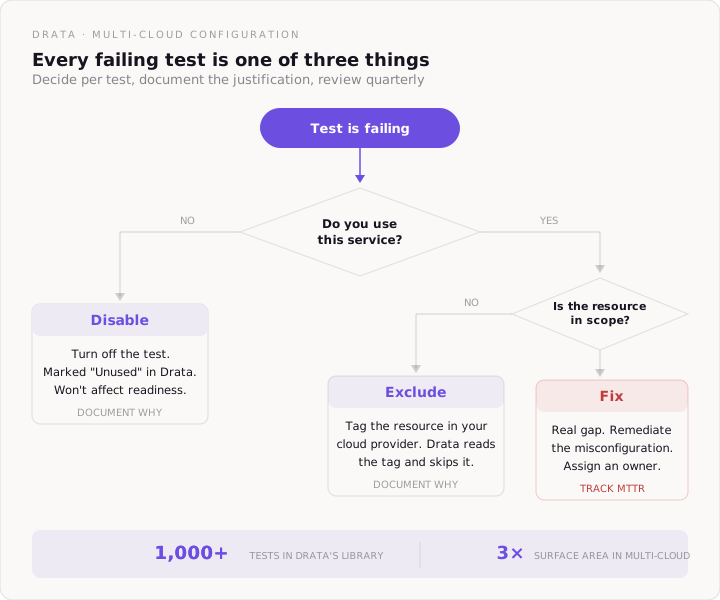
Which tests should I disable vs. exclude vs. fix?
Three categories:
- Disable tests that target services you don't use. If you don't run Classic Load Balancers in AWS, the Classic Load Balancer latency monitoring test is noise. Turn it off. Drata marks disabled tests as "Unused" — they won't count toward control readiness.
- Exclude specific resources from tests that are valid but overly broad. You run the S3 encryption test, but three buckets hold only public marketing assets. Exclude those three buckets. The test keeps running on everything else.
- Fix everything that represents a genuine gap in a production, in-scope environment. Open security groups, missing logging, unencrypted databases, root account activity — these are real findings. Remediate them.
Document every disable and exclude decision with a one-sentence justification. Your auditor will review them.
How do I handle cloud-specific tests that overlap?
Multi-cloud environments create a duplication problem. AWS, Azure, and GCP each have their own test sets for encryption, logging, network security, and access control. The underlying compliance requirement is the same — but the implementation details differ per provider.
Map tests to controls, not to clouds. Drata lets you map multiple tests to a single compliance control. Your "data at rest encryption" control might map to three separate tests: one for AWS KMS, one for Azure Key Vault, one for GCP Cloud KMS. All three feed evidence into the same control.
This prevents a situation where one cloud passes and another fails on the same requirement — and nobody notices because they're looking at different dashboards.
What about Compliance as Code?
If you manage infrastructure with Terraform, Drata's Compliance as Code integration scans your IaC repositories for misconfigurations before they reach production. It covers 30+ tests across AWS services and supports SOC 2, ISO 27001, PCI DSS, HIPAA, and GDPR.
The value in a multi-cloud setup: you catch configuration drift at the pull request stage. A developer pushes a Terraform change that opens a security group. Drata flags it in the PR. The fix happens before deployment — not three weeks later when the monitoring test fires and creates a failure nobody understands.
For on-prem or homegrown systems that don't have native integrations, use Custom Connections and Tests. You define the test logic, submit evidence through the API, and map results to controls. This ensures your compliance monitoring covers your full environment.
What's the right configuration sequence for multi-cloud?
- Week 1: Define your compliance scope and account map. Connect production cloud accounts only. Review default tests and disable anything targeting unused services.
- Week 2: Tag out-of-scope resources in each cloud provider. Connect your identity provider and HRIS. Review infrastructure failures and begin remediation on real gaps.
- Week 3: Connect secondary accounts (staging, shared services). Apply resource exclusions. Set up Compliance as Code for Terraform repositories. Map tests to controls across all three clouds.
- Week 4: Connect remaining integrations (task tracker, vulnerability scanner). Verify test-to-control mappings. Confirm every disabled test and exclusion has a documented justification. Review your compliance readiness score.
How do I keep it clean after initial setup?
Assign test ownership. Every failing test needs an owner — a person, not a team. Drata tracks Mean Time to Resolution per test. If nobody owns the failure, nobody fixes it.
- Review exclusions quarterly. Resources change. An excluded dev database might get promoted to production. A disabled test might become relevant when you adopt a new service. Build a quarterly review into your compliance calendar.
- Monitor before you add. When you spin up a new cloud account or adopt a new service, scope it against your compliance boundary first. Then connect it. The five minutes of planning prevents the 200-failure dashboard explosion that started this whole problem.
The bottom line: Drata in a multi-cloud environment is powerful — but only if you configure it with the same discipline you'd apply to your infrastructure. Scope first, connect selectively, tag aggressively, and document every exception. The dashboard should reflect your actual compliance posture. Not every resource across three clouds that happens to exist.
Cloudsapio can help you with:
Ready to move faster?
Too much to do,
too important to ignore.
Start with a 30-minute discovery call. If we're not the right fit, we'll tell you and point you in the right direction. If we are, we'll leave the call with a clear plan to get you up and running.