Hardening Google Workspace for SOC 2: 15 Admin Console Settings
Hardening Google Workspace for SOC 2: 15 Admin Console Settings
TL;DR
- Google's own SOC 2 doesn't cover how you configured Google Workspace; that part is on you.
- Fifteen admin console settings matter most, led by enforcing 2-Step Verification, locking down OAuth app scopes, and turning off "anyone with the link" as your default Drive sharing setting.
- All fifteen live in the free Admin Console, no tool purchase required, though a compliance platform helps prove they stayed on once you're maintaining SOC 2 year over year.
- If you only have time for two things today, fix 2SV enforcement and Drive sharing default; those two settings account for the most audit findings.
Google Workspace has its own SOC 2 report. Yours doesn't inherit it. Under the shared responsibility model, your auditor doesn't care what Google secured; they care what you configured. And most companies configured nothing, because the defaults are built for "sign up in 90 seconds," not "survive an audit."
Wait, Google already has SOC 2. Why do I need to do anything?
Because Google's SOC 2 covers Google's infrastructure. It says nothing about whether your intern has Super Admin, whether your Drive files are shared with "anyone with the link," or whether your team logs in with a password from 2019. That part is entirely on you, and it's exactly the part your auditor samples first.
Fine. What are the 15 settings?
Here's the list, roughly in the order we'd tackle it.
Enforce 2-Step Verification for everyone. Not "allow it." Enforce it. Admin Console → Security → Authentication → 2-Step Verification. Set a deadline, then lock the door.
Restrict which 2SV methods are allowed. SMS is phishable. Turn it off and push people toward an authenticator app or a hardware security key.
Minimize Super Admin accounts. Count how many people currently have it. If the number surprises you, that's the finding.
Build custom, least-privilege admin roles. Most people don't need Super Admin, they need "can reset passwords" or "can manage one OU." Give them that instead.
Set up Context-Aware Access policies. Require a managed device or a specific location for anyone touching sensitive apps.
Cap session length and force re-authentication. A login that never expires is a login an auditor will ask you to explain.
Lock down third-party OAuth app access. By default, employees can grant any random app full read access to their email and Drive with one click. Turn that into an allowlist.
Restrict scopes on "Sign in with Google." Same problem, narrower door. Limit what data a connected app can actually request.
Turn off "anyone with the link" as the default Drive sharing setting. This one setting alone accounts for more audit findings than almost anything else on this list.
Set up DLP rules in Drive. Catch Social Security numbers and API keys before they land in a public folder, not after.
Configure SPF, DKIM, and DMARC for Gmail. Auditors check this. Attackers spoofing your domain check it too, more often.
Turn on advanced phishing and malware protection. It's a toggle, not a project. Flip it.
Set a real password policy if you're not fully on SSO. Minimum length, no reuse, no "Password1!" energy.
Turn on audit log retention and export logs somewhere durable. "We didn't keep logs" is a worse sentence to say to an auditor than almost any individual misconfiguration.
Lock down recovery options on admin accounts. A personal Gmail address as the recovery email for your Super Admin account is not a controls gap; it's a plot twist.
cloudsapio manages Google Workspace with
the same security team that runs our SOC 2
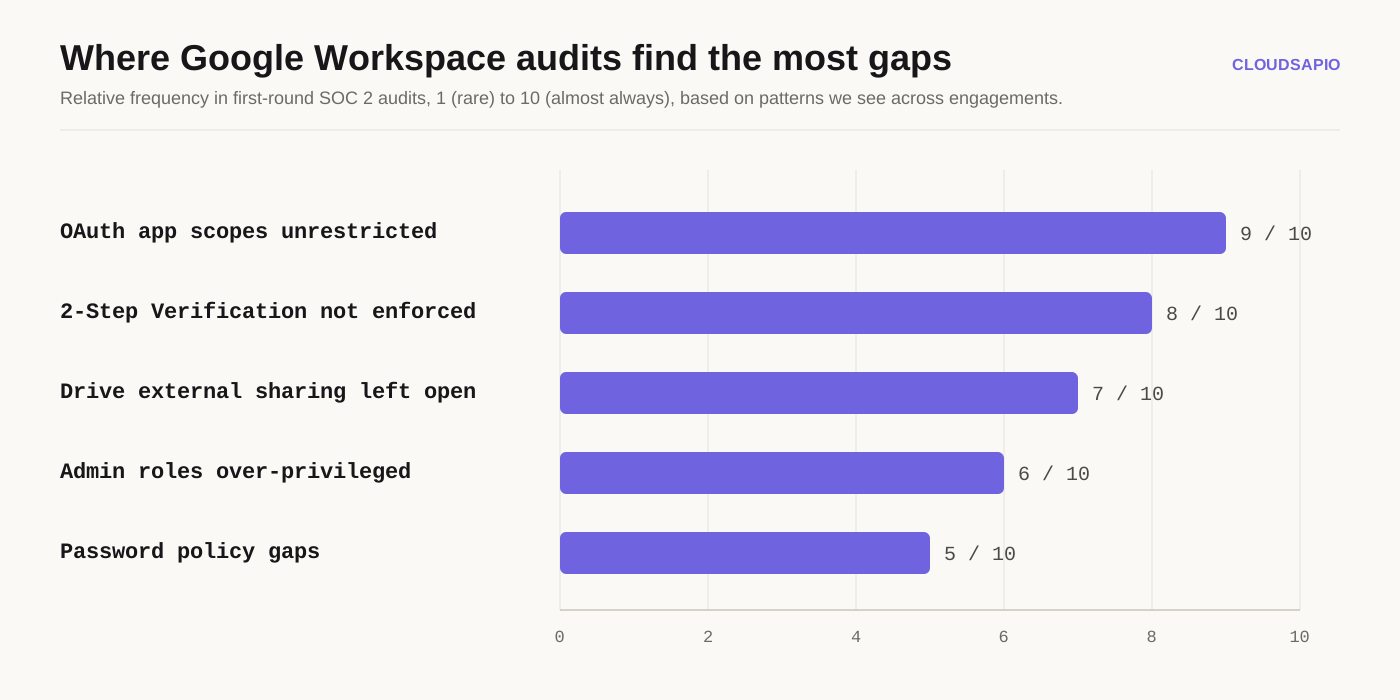
Which of these actually gets flagged most in real audits?
Roughly in this order, based on what tends to surface first.
The pattern holds across most first-time engagements: the settings nobody thinks to check- OAuth scopes and Drive sharing- show up far more than the ones everyone assumes matter, like password complexity.
How long does this actually take?
If you're doing it manually, plan for a focused afternoon to get through the authentication and admin role settings, then another session for OAuth and Drive sharing, since those touch more of the org and need a bit more coordination with your team. Most of this is toggles, not projects. The slow part is usually deciding who actually needs which access, not clicking the settings themselves.
Do I need to buy a tool to do this?
No. Every setting on this list lives in the free Admin Console. A compliance platform (Vanta, Drata, whoever) will monitor these settings continuously and generate evidence for your auditor automatically, which is genuinely useful once you're maintaining compliance year over year. But the initial hardening itself doesn't require buying anything.
What if I only have time to do one thing today?
Enforce 2-Step Verification and fix your default Drive sharing setting. Those two alone close the two doors attackers and auditors both walk through first.
FAQs
Does hardening Google Workspace alone get me SOC 2 compliant?
No. Workspace covers identity, email, and file sharing controls, which is a meaningful chunk of the Trust Services Criteria (mainly CC6.1 through CC6.7), but SOC 2 also touches your cloud infrastructure, your vendor management, and your internal policies.
How often do I need to review these settings?
For a SOC 2 Type II audit, your auditor wants evidence these settings stayed correct across the whole observation period, not just on the day you turned them on. Quarterly reviews are a reasonable minimum.
What's the single riskiest default setting in Google Workspace?
Unrestricted OAuth app access. It's invisible until someone connects a sketchy Chrome extension to their work email, and then it's very visible.
Do I need Google Workspace Enterprise for any of this?
Most of these settings exist on Business Standard and above. A few of the more advanced Context-Aware Access and DLP features are Enterprise-only, so check your current plan before you plan around a feature you don't have yet.
Can I automate proving these settings stayed on?
Yes, that's what compliance platforms and continuous monitoring exist for. Manually screenshotting the Admin Console every quarter works, but nobody enjoys it.
Ready to stop guessing which settings actually matter?
cloudsapio will walk your Workspace tenant against SOC 2 controls, tell you exactly what's misconfigured, and help you fix it before an auditor finds it for you. Book a call →
Ready to move faster?
Too much to do,
too important to ignore.
Start with a 30-minute discovery call. If we're not the right fit, we'll tell you and point you in the right direction. If we are, we'll leave the call with a clear plan to get you up and running.